
Get Alexa Developer Support
If you have questions about Alexa features, development, or certification that aren't answered in the Alexa developer documentation, you can chat with the DevAssistant for support. The DevAssistant is an AI-powered assistant available on every page of the Alexa developer portal. The DevAssistant can answer most questions and troubleshoot issues that you have.
Ask the DevAssistant for support
The DevAssistant is available on every Alexa developer page. Choose the DevAssistant icon to open the chat. You can access help without leaving your current page.

The DevAssistant can help you in the following ways:
- Troubleshoot errors and failed certifications.
- Find relevant technical documentation.
- Understand Alexa smart home interfaces and APIs.
- Troubleshoot account and publishing issues.
- Create support cases with full context.
- View the status of your open cases.
To start a conversation
- Sign in to Amazon developer services.
- Select the DevAssistant widget or open the full screen version.
- To let the assistant know that you need help with Alexa, open the All Amazon Developer menu in the chat box, and then choose Alexa or Alexa+. Or, enter Alexa or Alexa+ in the chat box.
- Enter text in the chat box that describes your question or issue in natural language.
Tip: Include relevant details, such as the Alexa product (Alexa+, Smart Home, Smart Properties), error codes, skill IDs, or device IDs. The more context you provide, the faster DevAssistant can help.
- Continue to chat with the assistant as it requests missing or ambiguous information.
As you chat, the assistant summarizes what it understands and asks clarifying questions. DevAssistant searches technical documentation, known issues, and support knowledge bases to provide step-by-step guidance.
Create a support case
If the DevAssistant can't answer your questions or you need further assistance, the DevAssistant offers to create a support case on your behalf and includes the conversation in the details. After the assistant creates a support case, Amazon assigns a case number to your inquiry, and then contacts you at the email address associated with your Amazon developer account.
To submit your support case
- If you want to open a support case before the DevAssistant offers to open one, enter file a case in the text box.
- Answer any questions the assistant asks.
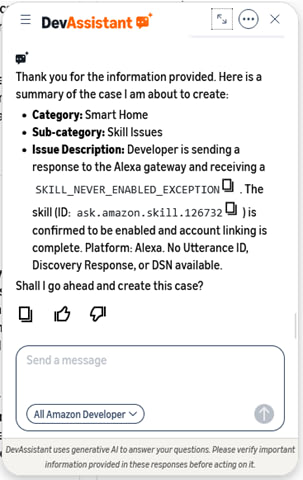
- Review the generated case summary.
- To add more details, chat with the assistant.
- To create the case, enter Yes in the chat box.
- To add more details after you open the case, reply directly to the case notification email you receive from the Amazon support team.
The following image shows an example case summary.
View support case status
You can view the status of your open cases at any time by asking the DevAssistant. For example, enter: What's the status of my open cases? or Reopen my case. The DevAssistant displays your cases with the following details:
- Case ID – Unique ID for your case.
- Subject – Summary of the issue.
- Category – Topic area of the case.
- Status – Current state, such as In Progress, Resolved, or Pending.
- Last updated – Date of the most recent action.
- Assigned to – Current owner and action being taken.
You can also add notes to an existing case directly by chatting with the DevAssistant.
Case resolution
A typical response time is two business days. To correspond with the Amazon developer support team about your case, chat with the DevAssistant or open the link in your confirmation email to view your inquiry status and add further information. After Amazon resolves a case, you can reopen the case by asking the DevAssistant.
Amazon support timelines
Amazon strives to provide quick and accurate support to resolve questions. To protect developers and customers, Amazon declines requests that aren't consistent with Amazon policies. If the Alexa developer support team informs you that they won't take any further action on an issue, please do not try to reopen the case or raise the issue in other cases. In addition, the Alexa developer support team routes security-related concerns to the appropriate team. Responses to such inquiries will vary based on the complexity and severity of the issue.
Related topics
Last updated: frontmatter-missing
