
react-native-localize
在本文中,您将学习如何在Vega TV应用中使用react-native-localize程序包。您可以阅读有关Vega SDK中支持的方法的信息。
react-native-localize程序包可帮助您为每位用户创建个性化体验,让您能够:
- 处理多种语言
- 设置日期和时间格式
- 设置货币
- 管理其他地区设置
@amazon-devices/react-native-localize库在适用于Vega的React Native (RNK) 应用中使用Localize React Native。该库提供本地化和国际化支持,让您可以根据不同的语言、地区和文化调整应用。
为什么要对电视应用进行本地化?
- 用户体验: 用户更喜欢能采用其语言并了解其所在地区首选项的应用。
- 全球影响力: 您可以提升应用对国际市场上更广泛受众的吸引力。
- 法律合规性: 您可以确保遵守各个地区的法规。
安装
-
在
package.json文件中添加JavaScript库依赖项。选择适用于您的React Native版本的选项卡。
   "dependencies": {
         ...
         "@amazon-devices/react-native-localize": "~2.0.0"
   }
"dependencies": { ... "@amazon-devices/react-native-localize": "~2.1.9000000000-rn-83" } -
将
getCurrencies导入您的首选组件:import { getCurrencies } from '@amazon-devices/react-native-localize'; -
在项目根目录上运行
npm install来安装程序包。 -
成功安装后,运行您的Vega项目。
示例
模拟器与设备
react-native-localize程序包中方法针对模拟器的返回值可能与针对设备的返回值不同。例如,模拟器上的getCountry() 方法返回US,但对于设备,返回值基于设备的语言设置。
| 方法 | 模拟器 | 设备 |
|---|---|---|
| getLocales | 相同 | 相同 |
| getCurrencies | 相同 | 相同 |
| getCountry | 固定值 | 视设备而定 |
| getTimeZone | 固定值 | 视设备而定 |
| getCalendar | 固定值 | 视设备而定 |
以下是如何使用@amazon-devices/react-native-localize的示例。
import { getCurrencies, getLocales } from "@amazon-devices/react-native-localize";

console.log(getLocales());
console.log(getCurrencies());
API参考
getLocales()
根据用户的设备返回区域设置列表。
- languageCode
- scriptCode
- languageTag
- isRTL
方法类型
type getLocales = () => Array<{
  languageCode: string;
  scriptCode?: string;
  countryCode: string;
  languageTag: string;
  isRTL: boolean;
}>;
可能的输出:
local: [
{"languageCode":"af","scriptCode":"","countryCode":"","languageTag":"af","isRTL":"false"},
{"languageCode":"af","scriptCode":"","countryCode":"NA","languageTag":"af-NA","isRTL":"false"},
{"languageCode":"af","scriptCode":"","countryCode":"ZA","languageTag":"af-ZA","isRTL":"false"},
{"languageCode":"agq","scriptCode":"","countryCode":"","languageTag":"agq","isRTL":"false"},
{"languageCode":"agq","scriptCode":"","countryCode":"CM","languageTag":"agq-CM","isRTL":"false"},
{"languageCode":"ak","scriptCode":"","countryCode":"","languageTag":"ak","isRTL":"false"},
{"languageCode":"ak","scriptCode":"","countryCode":"GH","languageTag":"ak-GH","isRTL":"false"},
{"languageCode":"am","scriptCode":"","countryCode":"","languageTag":"am","isRTL":"false"},
{"languageCode":"am","scriptCode":"","countryCode":"ET","languageTag":"am-ET","isRTL":"false"},
{"languageCode":"ar","scriptCode":"","countryCode":"","languageTag":"ar","isRTL":"true"},
{"languageCode":"ar","scriptCode":"","countryCode":"AE","languageTag":"ar-AE","isRTL":"true"},
{"languageCode":"ar","scriptCode":"","countryCode":"BH","languageTag":"ar-BH","isRTL":"true"},
{"languageCode":"ar","scriptCode":"","countryCode":"DJ","languageTag":"ar-DJ","isRTL":"true"},
{"languageCode":"ar","scriptCode":"","countryCode":"DZ","languageTag":"ar-DZ","isRTL":"true"},
{"languageCode":"ar","scriptCode":"","countryCode":"EG","languageTag":"ar-EG","isRTL":"true"},
{"languageCode":"ar","scriptCode":"","countryCode":"EH","languageTag":"ar-EH","isRTL":"true"},
{"languageCode":"ar","scriptCode":"","countryCode":"ER","languageTag":"ar-ER","isRTL":"true"},
{"languageCode":"ar","scriptCode":"","countryCode":"IL","languageTag":"ar-IL","isRTL":"true"},
{"languageCode":"ar","scriptCode":"","countryCode":"IQ","languageTag":"ar-IQ","isRTL":"true"},
{"languageCode":"ar","scriptCode":"","countryCode":"JO","languageTag":"ar-JO","isRTL":"true"},
{"languageCode":"ar","scriptCode":"","countryCode":"KM","languageTag":"ar-KM","isRTL":"true"},
{"languageCode":"ar","scriptCode":"","countryCode":"KW","languageTag":"ar-KW","isRTL":"true"},
{"languageCode":"ar","scriptCode":"","countryCode":"LB","languageTag":"ar-LB","isRTL":"true"},
{"languageCode":"ar","scriptCode":"","countryCode":"LY","languageTag":"ar-LY","isRTL":"true"},
{"languageCode":"ar","scriptCode":"","countryCode":"MA","languageTag":"ar-MA","isRTL":"true"},
{"languageCode":"ar","scriptCode":"","countryCode":"MR","languageTag":"ar-MR","isRTL":"true"},
{"languageCode":"ar","scriptCode":"","countryCode":"OM","languageTag":"ar-OM","isRTL":"true"},
{"languageCode":"ar","scriptCode":"","countryCode":"QA","languageTag":"ar-QA","isRTL":"true"},
{"languageCode":"ar","scriptCode":"","countryCode":"PS","languageTag":"ar-PS","isRTL":"true"},
{"languageCode":"ar","scriptCode":"","countryCode":"SA","languageTag":"ar-SA","isRTL":"true"},
{"languageCode":"ar","scriptCode":"","countryCode":"SD","languageTag":"ar-SD","isRTL":"true"},
{"languageCode":"ar","scriptCode":"","countryCode":"SO","languageTag":"ar-SO","isRTL":"true"}
...
示例
import React, { useEffect, useState } from 'react';
import { View, Text, StyleSheet } from 'react-native';
import { getLocales } from '@amazon-devices/react-native-localize';

export const App = () => {
  const [localeInfo, setLocaleInfo] = useState(null);

  useEffect(() => {
    const locales = getLocales();

    if (locales && locales.length > 0) {
      const locale = locales[0];
      setLocaleInfo({
        languageTag: locale.languageTag,
        languageCode: locale.languageCode,
        countryCode: locale.countryCode,
        isRTL: locale.isRTL,
      });
    }
  }, []);

  return (
    <View style={styles.container}>
      <Text style={styles.text}>Locale Information:</Text>
      {localeInfo ? (
        <View>
          <Text style={styles.text}>
            Language Tag: {localeInfo.languageTag}
          </Text>
          <Text style={styles.text}>
            Language Code: {localeInfo.languageCode}
          </Text>
          <Text style={styles.text}>
            Country Code: {localeInfo.countryCode}
          </Text>
          <Text style={styles.text}>
            Is RTL: {localeInfo.isRTL ? 'Yes' : 'No'}
          </Text>
        </View>
      ) : (
        <Text style={styles.text}>Loading locale...</Text>
      )}
    </View>
  );
};

const styles = StyleSheet.create({
  container: {
    flex: 1,
    justifyContent: 'center',
    alignItems: 'center',
    backgroundColor: '#F5FCFF',
  },
  text: {
    fontSize: 18,
    marginBottom: 10,
  },
});
Output:
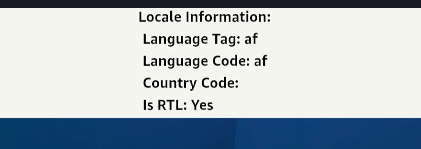
getNumberFormatSettings()
返回数字格式化设置。
方法类型
type getNumberFormatSettings = () => {
  decimalSeparator: string;
  groupingSeparator: string;
};
示例
import { getNumberFormatSettings } from "@amazon-devices/react-native-localize";

console.log(getNumberFormatSettings());
/* -> {
  decimalSeparator: ".",
  groupingSeparator: ",",
} */
getCurrencies()
返回所有货币的列表。
方法类型
type getCurrencies = () => string[];
示例
import { getCurrencies } from "@amazon-devices/react-native-localize";

console.log(getCurrencies());
// -> ["EUR", "GBP", "USD"]
可能的输出:
Currency: ["XXX","NAD","ZAR","XAF","GHS","ETB","AED","BHD","DJF","DZD","EGP","MAD","ERN","ILS","IQD","JOD","KMF","KWD","LBP","LYD","MRU","OMR","QAR","SAR","SDG","SOS","SSP","SYP","TND","YER","INR","TZS","EUR","AZN","BYN","ZMW","BGN","XOF","BDT","CNY","BAM","RUB","PHP","UGX","USD","IRR","CZK","GBP","DKK","KES","CHF","BTN","XCD","AUD","BBD","BIF","BMD","BSD","BWP","BZD","CAD","NZD","FJD","FKP","GIP","GMD","GYD","JMD","KYD","LRD","MGA","MOP","MUR","MWK","MYR","NGN","PGK","PKR","RWF","SBD","SCR","SEK","SGD","SHP","SLL","ANG","SZL","TOP","TTD","VUV","WST","ARS","BOB","BRL","CLP","COP","CRC","CUP","DOP","GTQ","HNL","MXN","NIO","PAB","PEN","PYG","UYU","VES","AFN","GNF","CDF","HTG","XPF","HRK","HUF","AMD","IDR","ISK","JPY","GEL","CVE","KZT","KHR","KPW","KRW","TRY","KGS","LAK","MZN","MKD","MNT","BND","MMK","NOK","NPR","AWG","SRD","PLN","STN","MDL","RON","UAH","LKR","ALL","RSD","TJS","THB","TMT","UZS","VND","TWD"]
getCountry()
根据用户设备的语言设置返回用户当前的国家/地区代码。例如,如果语言设置为印度英语,则该国家/地区返回为IN。
注意:如果您使用的是模拟器,Time Zone属性会输出Universal。
例如,此输出将设备的语言设置设为English India。
local: 786
Currency: INR
Country: IN
Time Zone: Europe/London
24 Hour clock: false
Calendar: gregorian
例如,此输出将设备的语言设置设为American English。
Country: US
Time Zone: Universal
24 Hour clock: false
Calendar: gregorian
getTemperatureUnit:fahrenheit
usesMetricSystem:false
方法类型
type getCountry = () => string;
示例1
import { getCountry } from "@amazon-devices/react-native-localize";

console.log(getCountry());
// -> "FR"
getCalendar()
返回用户的首选日历格式。
方法类型
type getCalendar = () =>
  | "gregorian"
  | "buddhist"
  | "coptic"
  | "ethiopic"
  | "ethiopic-amete-alem"
  | "hebrew"
  | "indian"
  | "islamic"
  | "islamic-umm-al-qura"
  | "islamic-civil"
  | "islamic-tabular"
  | "iso8601"
  | "japanese"
  | "persian";
示例
import { getCalendar } from "@amazon-devices/react-native-localize";

console.log(getCalendar());
// -> "gregorian"
getTemperatureUnit()
返回用户的首选温度单位。
方法类型
type getTemperatureUnit = () => "celsius" | "fahrenheit";
示例
import { getTemperatureUnit } from "@amazon-devices/react-native-localize";

console.log(getTemperatureUnit());
// -> "celsius"
getTimeZone()
根据用户设备的语言设置中的国家/地区,返回用户的当前时区。模拟器返回Universal时区。电视设备返回在设备设置中设置的时区,例如Europe/London。
例如,此输出将设备的语言设置设为American English。
Country: US
Time Zone: Universal
24 Hour clock: false
Calendar: gregorian
getTemperatureUnit:fahrenheit
usesMetricSystem:false
方法类型
type getTimeZone = () => string;
示例
import { getTimeZone } from "@amazon-devices/react-native-localize";

console.log(getTimeZone());
// -> "Asia/Yerevan"
uses24HourClock()
如果用户偏好24小时的时钟格式,则返回true;如果用户偏好12小时的时钟格式,则返回false。
方法类型
type uses24HourClock = () => boolean;
示例
import { uses24HourClock } from "@amazon-devices/react-native-localize";

console.log(uses24HourClock());
// -> true
usesMetricSystem()
如果用户偏好公制度量系统,则返回true;如果用户偏好英制度量系统,则返回false。
方法类型
type usesMetricSystem = () => boolean;
示例
import { usesMetricSystem } from "@amazon-devices/react-native-localize";

console.log(usesMetricSystem());
// -> true
usesAutoDateAndTime()
显示设备是否启用自动日期和时间设置。
方法类型
type usesAutoDateAndTime = () => boolean | undefined;
示例
import { usesAutoDateAndTime } from "@amazon-devices/react-native-localize";

console.log(usesAutoDateAndTime());
// -> false/true
usesAutoTimeZone()
显示设备是否启用自动时区设置。
方法类型
type usesAutoTimeZone = () => boolean | undefined;
示例
import { usesAutoTimeZone } from "@amazon-devices/react-native-localize";

console.log(usesAutoTimeZone());
// -> false
支持的版本
| NPM程序包版本 | Vega SDK版本 | Vega OS版本 | React Native版本 |
|---|---|---|---|
| 2.0.1758683737 | 0.23及更早版本 | 操作系统1.1 (1401010009820)及更早版本 |
0.72 |
| >=2.1.9000000000-rn-83 | 0.24 | 操作系统1.2 (2101020054720) |
0.72、0.83 |
相关主题
- 支持的第三方库和服务
- react-native-device-info — 要检索设备和应用信息,例如操作系统版本、设备型号、应用版本和捆绑包ID,请将
react-native-device-info程序包与react-native-localize一起使用。
Last updated: 2026年7月13日
